
Benchmarking
Offline Benchmark
Section titled “Offline Benchmark”FluxServe supports offline throughput benchmarking with JSONL input files. Complete the Docker installation first and run the examples from the FluxServe repository directory.
fluxserve bench_offline \ --model inclusionAI/LLaDA2.0-mini \ --dataset ./data/humaneval.jsonl \ --tp-size 1 \ --dp-size 1 \ --ep-size 1 \ --batch-size 4 \ --gen-len 512 \ --block-length 64 \ --use-decode-cuda-graphOnline Benchmark
Section titled “Online Benchmark”- Launch FluxServe engine
fluxserve serve \ --model inclusionAI/LLaDA2.0-mini \ --host 127.0.0.1 \ --port 8000 \ --tp-size 1 \ --dp-size 1 \ --ep-size 1 \ --max-num-seqs 4 \ --max-model-len 4096 \ --block-length 64 \ --threshold 0.95 \ --parallel-decoding threshold \ --attention-backend flashinfer \ --kv-cache-layout paged \ --scheduler-policy paged \ --use-decode-cuda-graph \ --cuda-graph-decode-mode padded \ --cuda-graph-capture-bs 1 2 4- Check server health
curl -fsS http://127.0.0.1:8000/health- In another shell, run the benchmark client against the running server.
fluxserve bench serve \ --model inclusionAI/LLaDA2.0-mini \ --dataset ./data/humaneval.jsonl \ --dataset-output-len 512 \ --request-rate 1 \ --max-concurrency 32 \ --metric-percentiles 50,90,99Published performance figure
Section titled “Published performance figure”The following figure is reproduced from the FluxServe repository at the source revision linked on this page. It compares decode throughput for LLaDA2.0 Mini and Flash on GSM8K and BigCodeBench across request rates.
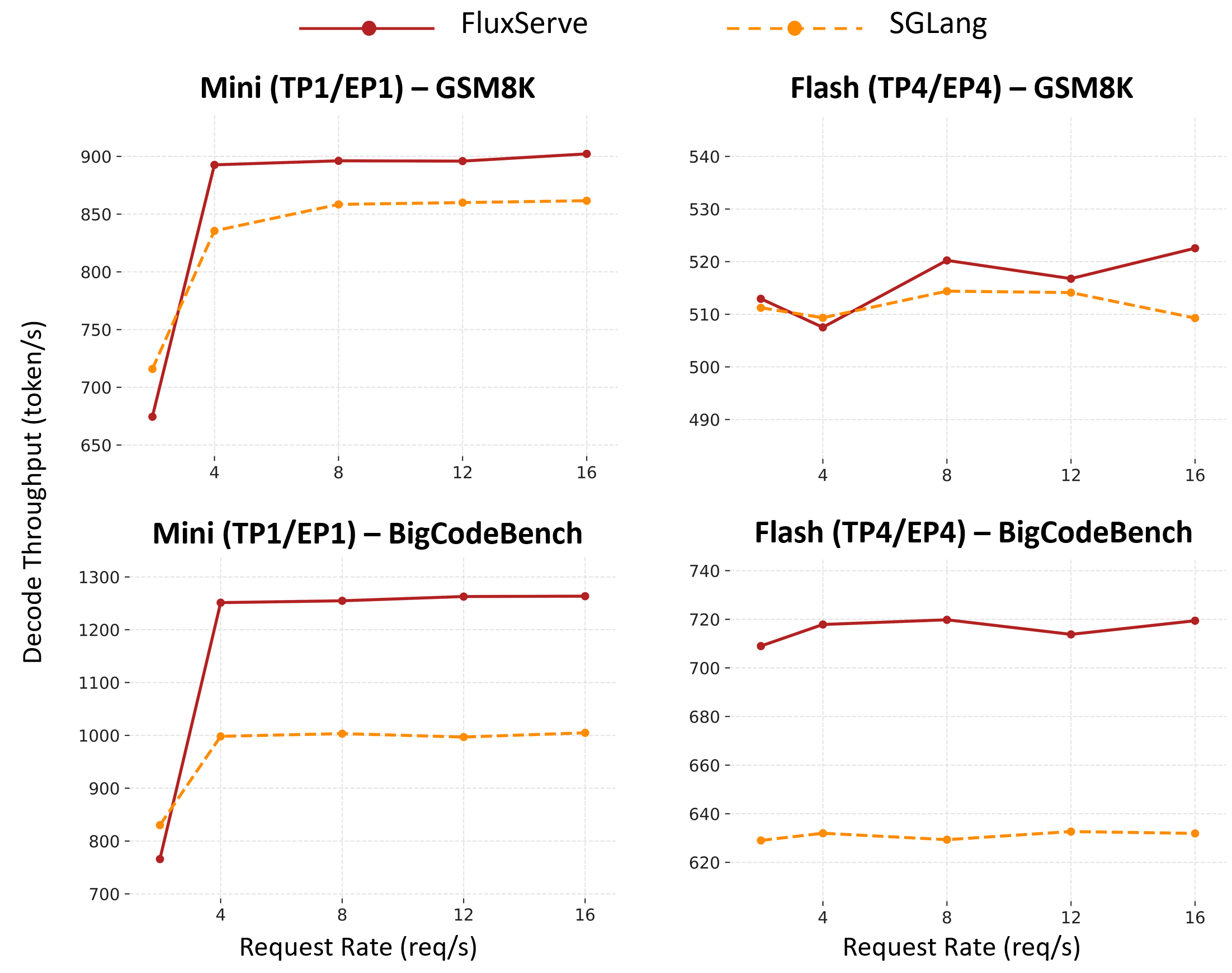
These are project-reported results, not measurements from building this website. The figure alone does not specify the complete hardware, software, and decoding configuration needed to reproduce it. Use the commands above to measure your own environment; do not infer a universal speedup from these curves.
Source revision: 7183e38.